넵! 새벽공부 바로 시작했습니다! 먼저, 동그라미가 캔버스 바닥에 닿을 때마다 마찰이 발생하는 것을 console 창에 나타내는 프로그램을 만들어 보겠습니다.
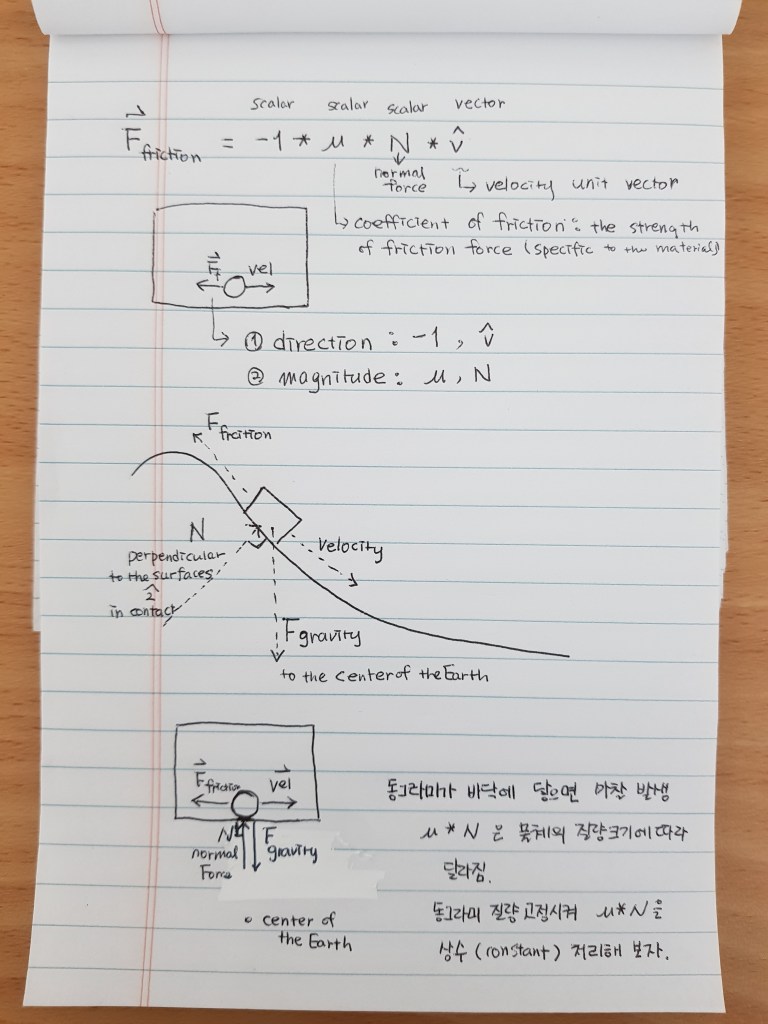
동그라미가 바닥에 닿을 때의 접촉면과 직각 방향으로 작용하는 Normal Force의 크기는 동그라미의 질량의 크기에 따라 달라집니다. 우리는 동그라미의 질량을 고정시켜 Normal Force의 크기도 고정시켜 상수(constant)로 다루기로 해요~^^*
먼저, 아래의 동영상을 클릭하여 6:33까지 보시며 오늘 공부 내용을 살펴 보시면 좋을 것 같아요~^^* 노트를 참고해 보시면 더욱 좋겠죠~^^*?
코드도 살펴 보실게요~^^*
class Mover{
  constructor(x,y,m){
    this.pos = createVector(x,y);
    this.vel = createVector(0,0);
    this.acc = createVector(0,0);
    this.mass = m;
    this.r = sqrt(this.mass)*10;
  }

  friction(){
    //바닥과의 접촉상태을 감지하여 마찰을 알리는 함수입니다.

    let diff = height - (this.pos.y + this.r);
    //캔버스 바닥(y = height)과 동그라미의 아랫부분 표면(pos.y + r)과의 거리를 변수 diff에 저장합니다.

    if(diff < 1){
      //캔버스 바닥과 동그라미 아랫부분 표면 사이의 거리가 1픽셀 미만일 때
      console.log('friction');
      //콘솔 창에 friction이라는 글자를 띄웁니다.

    }
  }
  applyForce(force){
    let f = p5.Vector.div(force, this.mass);
    this.acc.add(f);
  }
  edges(){
    if(this.pos.y >= height - this.r){
      this.pos.y = height - this.r;
      this.vel.y *= -1;
    }

    if(this.pos.x >= width - this.r){
      this.pos.x = width - this.r;
      this.vel.x *= -1;
    } else if(this.pos.x <= this.r){
      this.pos.x = this.r;
      this.vel.x *= -1;
    }
  }

  update(){
    this.vel.add(this.acc);
    this.pos.add(this.vel);
    this.acc.set(0,0);
  }

  show(){
    stroke(255);
    strokeWeight(2);
    fill(255, 100);
    ellipse(this.pos.x, this.pos.y, this.r*2);
  }
}
let mover;
function setup() {
createCanvas(400, 400);
mover = new Mover(100,200, 4);
}
function draw() {
background(0);
if(mouseIsPressed){
let wind = createVector(0.1, 0);
mover.applyForce(wind);
}
let gravity = createVector(0,0.2);
let weight = p5.Vector.mult(gravity, mover.mass);
mover.applyForce(weight);
mover.friction();
//동그라미와 캔버스 바닥과의 접촉상태를 감지하여 마찰을 알리는 함수를 호출합니다.
mover.update();
mover.edges();
mover.show();
}작심삼일이라면 삼일마다 다시 시작하고. 일찍 잠들어 버렸다면 일찍 일어나서 다시 시작하고. I did it all!을 외치게 되는 그 순간을 또 만나러 일어나 보아요. 넵, 꿈은 이루어 집니다! ^^*
 Silverback9
댓글 남기기