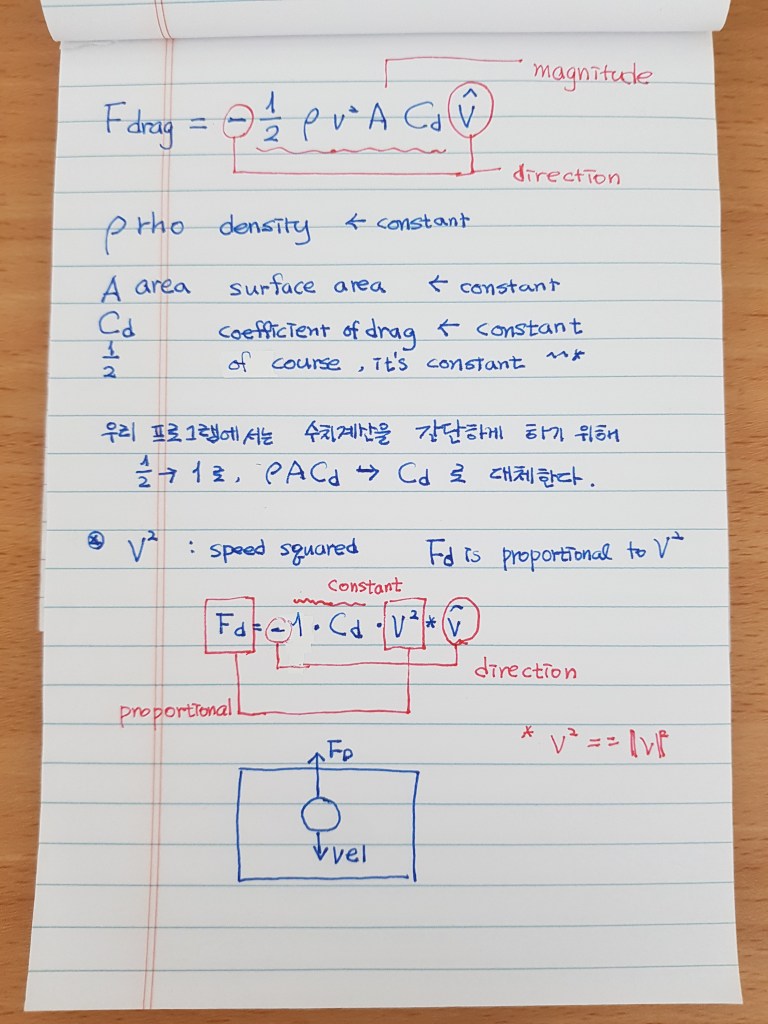
오늘부터 본격적으로 Drag Force 코딩을 시작해 볼게요. 어제 쉬었으니, 복습 삼아 동영상 강의를 처음부터 다시 보는 것도 좋을 듯 합니다~^^* 5:26까지 보시면 복습이 완료 되어요. 그리고 그 내용 노트를 참고해 보셔도 좋겠지요~^^* 그런 뒤, 7:40까지 보시면 오늘 코딩 공부 내용을 살펴 볼 수 있어요~^^*
class Mover{
  constructor(x,y,m){
    this.pos = createVector(x,y);
    this.vel = createVector(0,0);
    this.acc = createVector(0,0);
    this.mass = m;
    this.r = sqrt(this.mass)*10;
  }

  drag(){
    //drag 함수를 정의합니다.

    let drag = this.vel.copy();
    drag.normalize();
    drag.mult(-1);
    //벡터 drag의 방향을 벡터 vel과 반대방향으로 설정합니다.

    let c = 0.1;
    let speedSq = this.vel.magSq();
    drag.setMag(c*speedSq);
    //벡터 drag의 크기를 (drag 상관계수) * (속력의 제곱)으로 설정합니다.
    this.applyForce(drag);
    //벡터 drag를 동그라미가 받는 힘의 총합에 더합니다.

  }
  applyForce(force){
    let f = p5.Vector.div(force, this.mass);
    this.acc.add(f);
  }

  edges(){
    if(this.pos.y >= height - this.r){
      this.pos.y = height - this.r;
      this.vel.y *= -1;
    }
    if(this.pos.x >= width - this.r){
      this.pos.x = width - this.r;
      this.vel.x *= -1;
    } else if(this.pos.x <= this.r){
      this.pos.x = this.r;
      this.vel.x *= -1;
    }
  }

  update(){
    this.vel.add(this.acc);
    this.pos.add(this.vel);
    this.acc.set(0,0);
  }

  show(){
    stroke(255);
    strokeWeight(2);
    fill(255, 100);
    ellipse(this.pos.x, this.pos.y, this.r*2);
  }
}
let movers = [];
function setup() {
createCanvas(400, 400);
for(i = 0; i <10; i++){
movers[i] = new Mover(random(width), 100, random(1,8));
}
}
function draw() {
background(0);
for (let mover of movers){
if(mouseIsPressed){
let wind = createVector(0.1, 0);
mover.applyForce(wind);
}
let gravity = createVector(0,0.2);
let weight = p5.Vector.mult(gravity, mover.mass);
mover.applyForce(weight);
mover.drag();
//drag 함수를 호출합니다.
mover.update();
mover.edges();
mover.show();
}
}저는 아직 목감기가 좀 있네요. 그렇지만 밝고 긍정적인 마음으로 오늘 코딩 공부를 해내었어요! 목이 아플 때는 너무 재미있어서 정신이 혼미해지는 감기약 광고를 보는 거예요~^^*
오늘도 우리 왼발 오른발 왼발 내디디며 우리의 갈 길을 계속 걸어가 보아요!
따뜻하게 주무시며 푹 쉬는 밤 보내시구요~^^*
넵! 꿈은 이루어 집니다!!
 Silverback9
댓글 남기기